IdeaboxAI
Conversational agents for automating business workflows
IdeaBoxAI is a B2B platform that lets teams create AI agents without coding, using conversational interfaces, knowledge bases, and integrations to automate workflows and improve efficiency.
Role
Product Design
Design System
Visual Design
Team
Founder
Technical Architect
6 Engineers
2 Designers
Timeline
Nov 2024 - Aug 2025
Tool
Figma
Jira
Impact
Shipped the MVP in one year, securing 2 enterprise clients.


Product Overview
Problem
“Automation tools exist, but they’re not built for the teams who actually run operations”
Operational teams across sales, customer support, and supply chain still rely on repetitive manual tasks across multiple tools. Existing automation platforms often require technical setup or engineering support, making them difficult for non-technical teams to adopt and manage.
Opportunity
Make automation accessible through conversation
• Make automation accessible to non-technical operational teams
• Enable workflows to be created through natural conversation instead of complex configuration
• Bring tools, knowledge, and workflows into a single system
• Reduce operational overhead and manual coordination across teams
System Design
Digging into the backend to design the frontend

To design the platform experience, I worked with product owners and engineers to understand how the underlying system operated - including agent orchestration, knowledge retrieval, and integrations with external tools and APIs.
This helped me translate the backend architecture into a clear user-facing system where teams could build AI agents, connect data sources, and automate workflows without writing code.
Core Workflows / Solutions
How teams build and run AI agents
I worked in close collaboration with product owners and engineers across multiple development sprints.
Each sprint focused on one key capability of the platform — such as agent creation, knowledge connections,
tool integrations, and workflow automation.
Throughout the process, I continuously aligned with engineers to ensure that interaction patterns were feasible with the underlying architecture, translating technical capabilities into clear and intuitive user workflows.
Build and interact with custom AI agents
Teams can create agents tailored to their workflows and immediately interact with them through a conversational interface to automate tasks and retrieve insights.
Connect multiple knowledge sources to a single agent
Agents can be powered by multiple knowledge bases, combining information from documents, Google Drive, YouTube, databases, and other sources to provide richer and more accurate responses.

Automate operational workflows
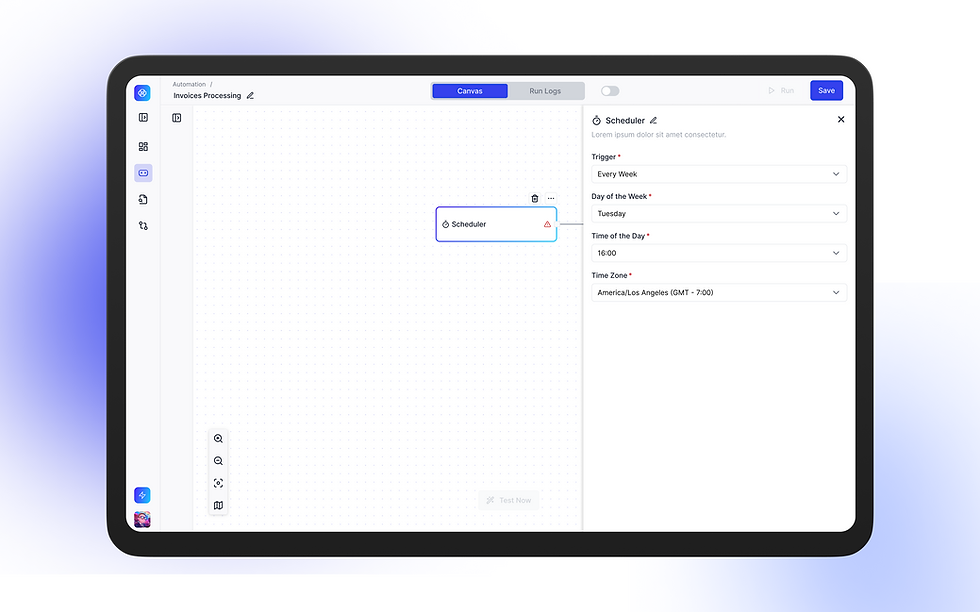
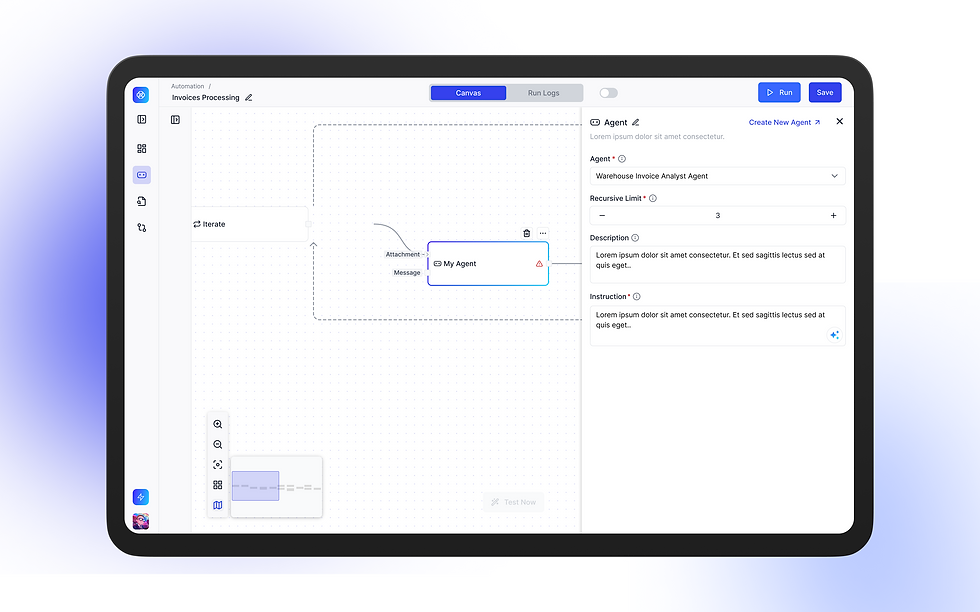
Users can configure automation workflows that allow agents to trigger actions across systems and streamline repetitive operational processes.

1. Add Trigger
.png)
2.Configure Scheduler
.png)
3. Connect data source & proceed with iteration
.png)
4. Assign AI Agent
Design Decisions
Improving usability and scalability through design decisions
Strengthening the design system and accessibility
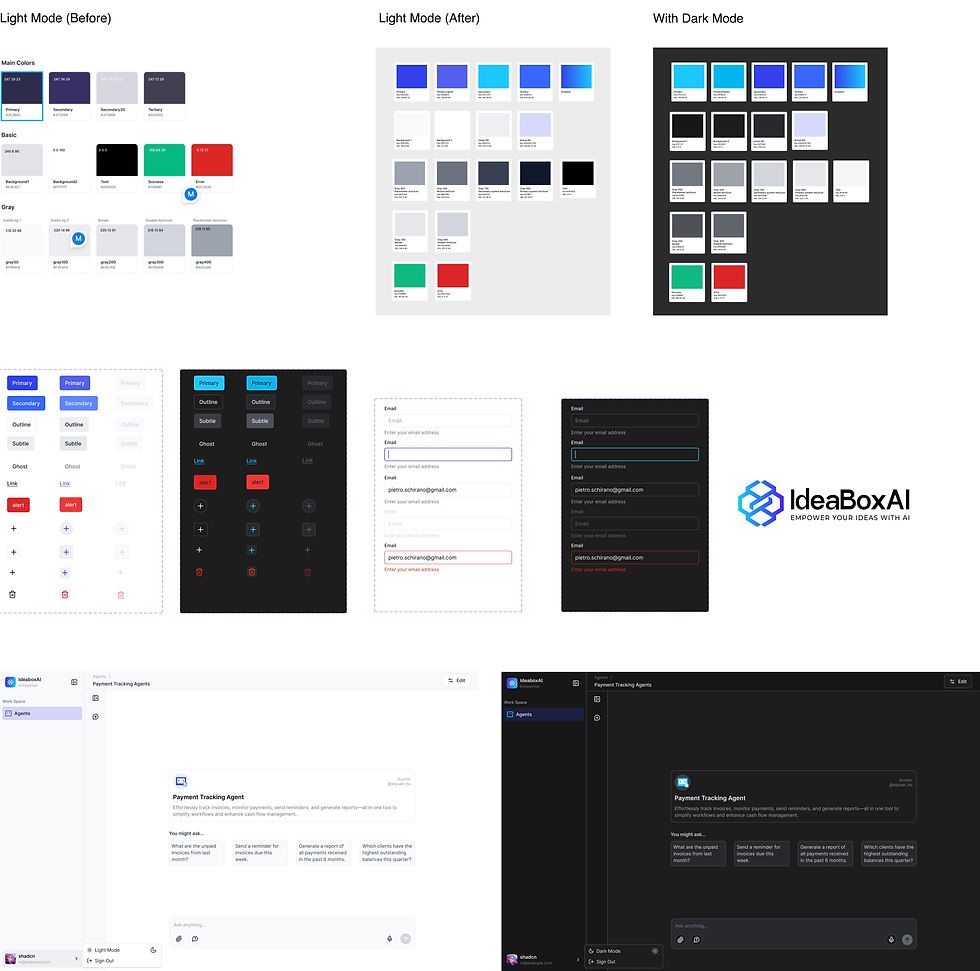
When I joined the project, the product owner asked me to re-evaluate the design system as the existing colors felt muted and lacked visual hierarchy.
I introduced a refreshed color system with stronger contrast and designed both light and dark modes to improve accessibility. I also established reusable UI components—from navigation to layout patterns—to ensure visual consistency as the product scaled.
.jpg)
Improving transparency in conversational AI responses
Usability testing revealed that users struggled to trust the agent’s responses because the reasoning steps were too minimal and lacked context about where the data was coming from.
To improve transparency, I redesigned the step structure to include expandable tags that reveal detailed reasoning, data sources, and generated code. Clicking a step opens a sidebar with deeper insights into how the agent processed the request.
Before
.jpg)
After
Standardizing API tool configurations
Researched existing AI tool configuration patterns and designed a standardized tool interface within the Ideabox AI design system to support agent-based workflows.

Reflection
Designing IdeaBoxAI reinforced that AI products are not just interface problems - they are system design challenges that must remain understandable to users
Good AI design is not about making systems appear intelligent - it’s about making their decisions understandable.
Working closely with product owners and engineers taught me how product strategy and backend architecture directly shape the user experience. It reinforced the importance of understanding how the system works behind the scenes, then breaking it down flow by flow to design interactions that are both feasible and intuitive.
Let's Build
Together
© 2026 Shimona Roy